If paying is easy but logging the purchase is the part you forget, Receptify can help connect those two steps. Its Android app captures supported Google Wallet tap-to-pay notifications as pending payments. You still check the fields and save the expense.
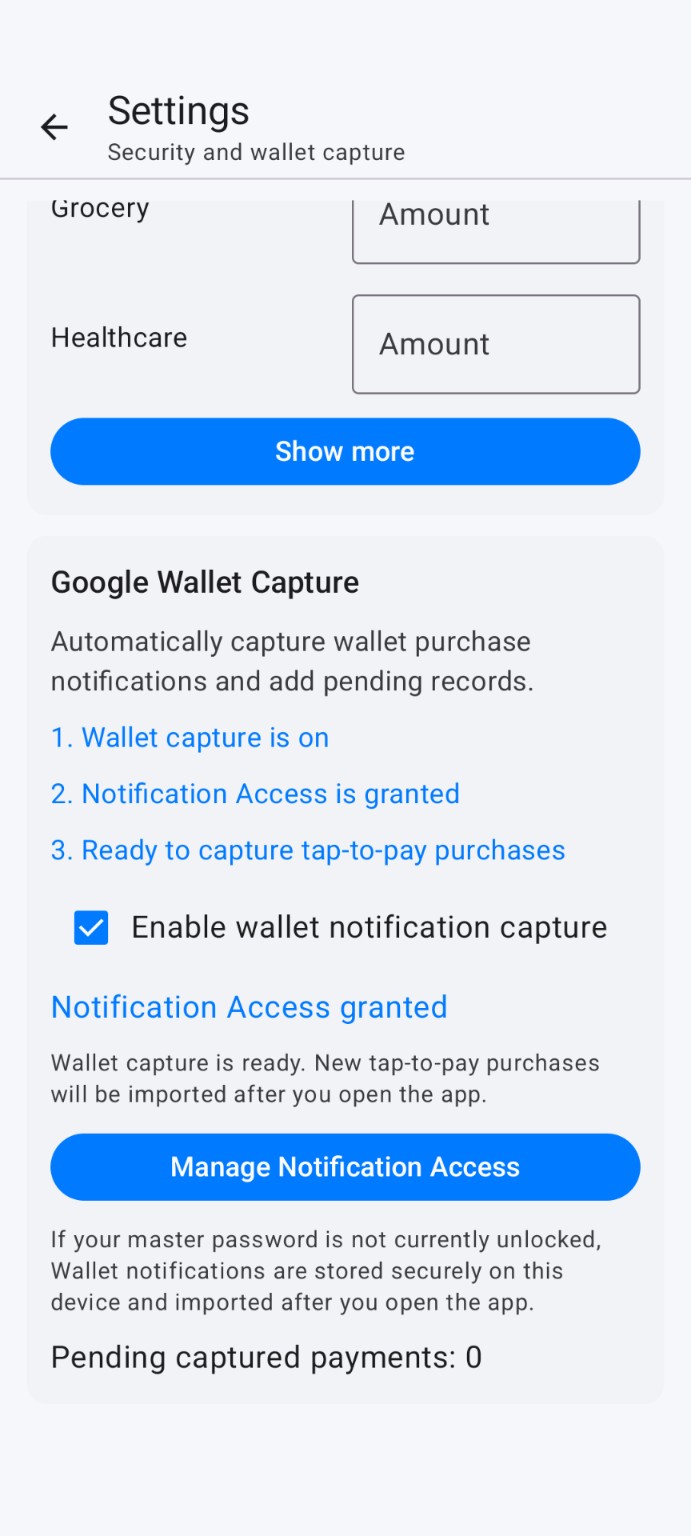
Set up Wallet capture
Start with a manual sample expense if you only want to learn the app. You do not need to make a purchase to test Receptify.
- Install the Android app and complete its initial setup.
- Open Settings, enable Google Wallet Capture, and grant notification access when Android asks. This permission is needed to read supported payment notifications.
- After a normal purchase that generates a supported notification, open Receptify and unlock it if needed. Check the pending captured payments.
- Review the amount, date and category, correct anything missing, and save the expense.
What notification capture actually covers
Capture depends on the notification your device receives. Availability can vary by payment, card, bank and region. It is not a bank connection and does not retrieve a complete history of previous transactions.
If your vault is locked, the settings screen explains that captured notifications remain on the device until you open the app. The web companion cannot read Android Wallet notifications.
If a payment does not appear
Check that both Wallet capture and notification access are enabled. Confirm that the purchase generated a supported notification. If it did not, enter the expense manually or import a receipt.
For example, if a coffee purchase does not appear in pending payments, recording it manually is a useful fallback. Do not assume that a missing notification means the transaction failed. Always check the amount before saving.
Build a small review habit
On your next few days of spending, open pending payments once and check what was captured. The useful question is whether reviewing a draft is easier than typing the whole record. Receptify also supports manual records and Android receipt imports when notification capture is not a fit.